Showing posts with label 3rd grade. Show all posts

Tuesday, November 11, 2014

Gobble! Gobble! Gobble!

Thanksgiving is a fun time for students as they are learning important parts of our nation's history (for those reading this blog from the States).  But it is also a time to have a little fun by incorporating some of the great foods, traditions, and crafts into our lessons...when we all have time! I have some sneaky ways to include fun into your classroom, while students are still learning and highly engaged!


Graphing

Thanksgiving Graphing:

I try to make my graphing unit (2nd grade) around the time Thanksgiving rolls around.  This is a great time period to have student survey family, friends, etc. and graph their results. In the past, with my 2nd grade team, we would have students survey family/friends about their favorite type of pie and show results on a Bar Graph.  You can also have fun with Pie Graphs given the name of the game!

I have created a simple document for you to model how to create data from surveying all the way to the analysis part.  I have a teacher example for all three stages.  The students have a "Take Home" document that tells them the steps to take and send the student copies home. Students are to complete a survey to at least 10 family/friends that they know, asking them their favorite Thanksgiving pie flavor.  You can obviously pick your own prompt, but the questioning will not go with it.  I have provided 25 survey ideas for you to use, to assign students, or to give students some ideas to survey friends/family members about. 

Get your own copy...HERE!


Graphing: Quick Assessment/Activity

After finishing the "Take-Home" assignment, you can test student's knowledge by having them complete a pre-made survey to create the bar graph and analysis portion. I have used this as a quick assessment to check my students' understanding of basic graphic.  Although, this activity does not make them do the surveying due to time.  It is also a fun activity to have students do the day before Thanksgiving as an educated math lesson, but still involves crayons and food!

Click HERE to get your own copy 
Another cookie version is available HERE

Numbers

Roll a Thanksgiving Dinner:

I love the "Roll a..." activity, and I have a few in my TPT store for you to get during all of the holidays throughout the school year. If you haven't heard of this type of activity, here is the breakdown:
  1. Students usually work in partners or small groups.
  2. They take turns rolling dice.
  3. Once they roll the dice, they read the number.  The number correlates with an item to draw to create their holiday picture. For example, if they roll a 1, they must draw the plate.  The fun comes in when they are looking for a specific number to roll to complete their picture and they can't get it.  
  4. Students should finish with, in this case, a Thanksgiving dinner drawn on the paper you provide them. 
It is a fun, silly, and teamwork game to play during the holiday week.  I usually use it during my centers, as they can have a couple "fun" activities, and a couple academically driven activities.

Here's the product...you know you want it!


For more "Roll a..." activities:


Tuesday, July 29, 2014

Back to School Night

Welcome to Our Class! 

Whether you have a Meet the Teacher, Back-to-School Night, or something similar it is best to come prepared and that is what this post will help you do! I do most of these preparations before the school year begins, although putting together folders might be a weekend job or something that a family member might be willing to help out with.  I really believe in these items below, as it keeps parents/guardians on the same page from Day #1.  They know my expectations, and they realize they have their own set of expectations as well.  Look through the post, and feel free to comment with other suggestions and/or questions. 

Parent Folders

Parents receive "Parent Folders" that is filled with many helpful resources and information.   It is located on their child's desk, and I explain the folder during my presentation.  I put together a bright yellow folder with the following pieces of literature (most of which I found through Pinterest). Thank you to my fellow bloggers for providing these wonderful resources! 

- Helpful "At Home" tips for spelling
- Helpful "At Home" tips for math
- Why Read at home?
- Questions to ask child during reading: Fiction & Nonfiction
- Parent School: Reading Skills #1 (give these out monthly)
- Magnet with my contact information
- Brochure (below)
- Any school forms
- Classroom volunteer form
- Classroom Dojo Forms (Classroom Management)
- Common Core for Parents (If your state has made the switch)

Parents are told to keep these folders, as I will send helpful resources home throughout the year, so they are able to help with skills and standards at home as well.  I know it seems like a lot, and not every parent will take advantage of those items.  But if you can just help one parent make learning at home easier...the folders have done their job! The folders are a must in my classroom now, and I now that I have all the documentation organized, it makes it a lot easier from year to year!

Brochure

This year I decided to do something different.  I wanted to create a brochure for a different "look" rather than the letter format.  I wanted it to look different as I knew I was already giving them a lot of paper within their folders.  I put information that parents need to know and have a resource to check periodically.  I go into detail during my presentation (see below), but I do not offer handouts of my PPT just to save paper. In the brochure I highlighted main subject areas, technology use, grading, standardized testing expectations, transportation, special class schedule, and a quick read about myself.  I felt these were the most important pieces of information, but obviously you may have other needs within your own classroom.

Student Work

Our Back-to-School Night is a few weeks into school, so students have completed a decent amount of writing activities/projects. Students are asked at the end of the day to open their Writing Binder to their favorite writing assignment they have completed.  This is great for parents to go in the classroom, find their child's seat, & start reading.  It allows me to be able to greet parents at the door, rather than having a back log of parents waiting to get in the classroom or speak with me.

Parent Sign In

On our back table, I have a sign in sheet, any documentation from the school (technology permission forms) and any additional notes I'd like the parents to see or have their own copy.  You can also make these nice for parents with some decor back there. Check out Pinterest if this is something that interests you! I know there are some other amazing set-ups.

Presentation

I give about a 15 - 20 minute PowerPoint presentation for a quick run-down on my expectations and items I want parents to know from the beginning.  I include things like:


  • Daily Schedule (Breakdown of how much ELA, Math, etc)
  • Detailed Schedule for morning & afternoon
  • Reading expectations
  • Spelling expectations
  • Math expectations
  • Expectations for the end of the year (Reading level, passing of tests, etc)
  • Daily communication (Daily Red Folder, Planner)
  • Homework (I talk about Writing Homework, as I feel parents need to know my high standards with this weekly assignment)
  • Parent Recommendations
  • Class Rules
  • School Rules
  • Classroom management (Class Dojo)
  • Pop Tab Program (Year-long philanthropy project)
  • Technology
  • Parent Involvement (& yellow folder discussion)
  • General Information
  • End with contact information (leave screen so they can program it in their phones if needed)


Sunday, July 20, 2014

Using Social Media & Technology in the Classroom

I challenge you to choose 2 of these forms of technology below to integrate into your classroom this year. As a person who loves technology, it can become overwhelming at times trying to stay up with posts as well as doing your daily job.  I am an avid user of a blog, Twitter, Classroom Dojo, & QR codes. I commend those educators that can include so many of these technologies in the classroom, and get a great participation from parents.

**Check your school district's policy on posting pictures, names, etc. on any type of social media website.  Each district has specific rules that you may have to follow. It is better to be safe, than sorry! 

Blog

Created a blog was my "baby steps" into the educational technology world.  My school district provides each teacher with the option for a classroom blog.  I fiddled around with it, and ended up loving it.  I change my theme from year to year to get a different feel.  At the beginning of the year, I am better about consistently posting 1-2x a week about things we're doing in the classroom. My students' parents had to sign a permission slip to allow pictures to be taken on the blog and other social media websites. I did have a few parents who did not want their child's photo online, which was fine.  I just had to make a conscious effort to keep them out of photos.   I really enjoyed showing the students the blog, and did it almost daily at the beginning of the year to get them excited about it.  I did this in hopes they would go home to show their parents, and then at that point it would become a part of their daily or weekly routine!

I used Wordpress to create my school blog, but as you can see I love Blogger, too. Whatever one you prefer will work! Try them both out.

Things I posted were: 
  • Photos of class activities
  • Reminders about tests/quizzes
  • Reminders about forms due, field trips, etc. 
  • Websites that could help with particular topics we're studying in class
  • Additional resources for parents
  • Videos of in-class activities or even other resources
  • Webcams of animals 
Screenshot of my blog.  You can see I have Twitter embedded in the blog as well.  
Check out my blog...HERE!


Twitter

I just started using Twitter this past school year (2013).  I attached the Twitter account to my blog, so they were able to see quick posts from Twitter as well.  Twitter seemed to be a good match for me.  I was able to put a quick picture up (immediately) without spending a lot of time typing a whole post. I did use this mostly for quick reminders and pictures.  It was nice to be able to show parents immediately what their kids were doing in class that day.  I would also follow other educational accounts and retweet ones that I find beneficial for my students and their families.

Things I posted were: 

  • Special guest teachers 
  • Pictures from science experiments
  • Reminders about tests/quizzes
  • Quick links to educational sites
  • Pictures (no videos)
  • Reminders about forms, field trips, picture days, etc. 
Facebook

As stated above, this is not one that I use in my classroom because I feel that my blog and Twitter combined is the same as Facebook.  I think I might have rethought my decision about a blog and did Facebook if it was allowed in the district at that time.  But I had already established a great blog that I enjoyed, so I wasn't going to stop doing that.  Many teachers use this to post pictures, videos, and reminders just as the other social media tools do.  I think that this and Twitter would be the best form to get to parents as they are common types of social media.  What are your thoughts?

Classroom Management

This year, I tried something new with Class Dojo.  This online program was amazing for my classroom! I explained it to students, showed them the online portal with the Sample Class they give you (with movie star names, might I add).  I also showed parents the online portal at Back-to-School Night.  This portal allows you to set up the positives and negatives, and it keeps track of a point.  One reason I really love this website is because if a student has a bad day and earns a few negative points, he/she can make it up later in the week by earning positive points.  I am a firm believer that everyone has a bad day, and you hate for a student to have a bad grade at the beginning of the week.  My guess is their behavior is going to continue to be bad, because Who cares?! I already have an "F"...it can't get any worse. I would often pull students aside to speak with them about their grade on Thursday or Friday.  This gave them the opportunity to push for great behavior and get his/her grade up.

Also, there are student and parent logins.  Parents can check daily on what their child is doing and how well he/she is performing.  I have parents who really appreciate a daily record.  They are able to talk about it with their child that same day. Students are able to login to a separate account to create their avatar and see how they are performing in class.
This is the report given daily & changes throughout the week. You can look at specific dates and even times of the day to try to figure out when students are doing certain behaviors.  To the left of the page is the personal citizenship score they receive.  The 94% is how the class is doing. I often will give extra rewards if they class together can earn an "A". 

**Updated: I received a few questions on how I distribute the grades to students/families and how I may discipline students for poor choices.  

Citizenship Folders: At my school, students receive a citizenship grade each quarter.  Students earn a citizenship grade each week based on their Dojo Score.  On Friday, I go to "Reports" and there is an option to print records for that particular week.  From there, Dojo sends out a report per student, and I would document that grade in the grade book.  I then would staple them in a manella folder.  Each week I staple the newest form on top.  This gives parents a hard copy to see how their student has performed from a week to week basis, especially if they do not have the ability to get online.  On the other side of the manella folder I have a sheet for parents to sign, recognizing that they saw the score from that week. Folders are due on Monday.  

Discipline:  I'll be honest, this part of Dojo was tricky for me and I had to get in a routine before I became successful at it.  I would keep track on a piece of paper (one of the only forms of paper I used) to see how many minutes students had to sit out of recess time.  This part is completely up to you, and it will depend on how often you give positive/negative points throughout the day.  I would go off percentages.  For example, I would say if you had a "B" in citizenship before recess, you may have to sit out of play time for 5 minutes.  Like I said, it depends on how you run your class and how anchored you are to using the Dojo system.  You could even have students check into their Dojo accounts if you have tablets or devices in the classroom.  

Remind (Formerly Remind 101)

I'll be honest, I have not used this type of technology in the classroom, because I do not want to overwhelm parents with the amount of technology I use in the classroom. Plus, I want to make the most of the few pieces of technology & social media for parents and their children.  Remind is a texting service, where your number is hidden.  You can send reminders out to parents about tests, picture days, bringing certain items back to school.  You set up the service, give the parents the number, and start sending them texts from the teacher.  Now, I have talked with fellow educators who have used this service, and some years they have better participation from parents than others.  What a great way to get a quick message across to parents without having to put together a last minute note to send home.  This service goes out to the whole group, not individual numbers, so clearly it is used for something that the entire class needs to know about.

QR Codes

This is definitely not a piece of technology I use a lot with parents, although I occasionally will put a QR Code on my Weekly Homework Sheet.  QR codes are little digital squares you've seen in magazines and many other products.  Once you scan the QR code with the app on your device, it will take you directly to a website.  You can create your own QR codes for free at QR Code Generator.  You will just save it as a picture and upload it to any document you would like to have it on! I created a QR Code Scavenger Hunt for something for parents and students to do while they wait for their Parent/Teacher Conference.  I attached my blog website, My Big Campus website, and a few fun websites for them to do while they wait for their conference.  I ended up leaving it outside my classroom for the rest of the year for another resource. I found this on Pinterest and adapted it for my own classroom use.  I found it at Transforming Teaching & Learning with iPads. Thanks to this blog for the great idea!! 


Also, since my classroom had a class set of tablets, I would create QR codes for certain websites (normally passages to read), and then students could scan the QR code with their tablet to begin the assignment. It just gives the lesson an added amount of engagement.  If you have just 1 tablet in the classroom, you could rotate it between tables/groups to complete an activity.  Get creative with what you have! 

Tablets/iPads

I applied for a small grant within my district to pilot a class set of tablets for my third graders this past year.  I will be honest, we had out ups and downs during this process but it was AMAZING for many of our classroom projects. I started off the tablet project with learning how to handle them.  I took this part very seriously, and students were sent to a regular classroom desktop computer if they mishandled them.  They were still able to do the activity, but without the tablet.  A few weeks into it (with the occasionally off day) they respected the rule and followed the directions.  Students did activities, special websites, and research.

Activities & Sites Often Used: 

My Big Campus

  • Used consistently as it allowed me to create lessons (bundles), have discussions, post websites/activities.  This website is a must as it allows the teacher to prepare things for the students ahead of time.  Help with organization and time saving for students! 

Padlet

  • I use this as a discussion tool.  Students may be reading from their reading books, passage, etc. and they will use this tool to post an answer or response to a question given.  I often turn on my Dukane to show their answers on the screen.  

Today's Meet

  • I use this also for discussing.  It is also a great first tablet activity.  I pose a silly question that they must answer on this website.  I turn the Dukane on, so the screen shows all of their answers.  It gets the students really excited about discussing! Then I sneak in some real questions. So sneaky, right? 


Thursday, July 17, 2014

First Day of School Activities

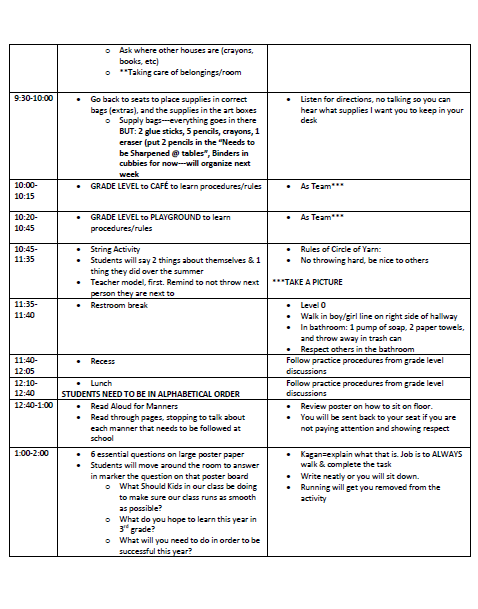
There are thousands of different things you can do on the first day, so I'm not saying mine is the perfect combination...it just works for me! I like to start the first day discussing and teaching them about teamwork. All of our [fun] activities are about teamwork throughout the day.  Let me clarify, this post is just about the activities you can do during the day, not the strategic, organizing, & procedures that need to be taught.  Check out An Organized First Day of School for more information in the preparing for this first day!

One suggestion I have to help first year teachers who are feeling a bit overwhelmed about planning for the first day is to keep with your normal time schedule.  What I mean by this is if you have scheduled an hour for your math block, do some sort of other activity (get to know you, supplies, organization, etc). for that hour.  This will get you set into the timing of your day when you get normal subject areas in the mix.  It will also train students with the natural transitions subconsciously. Now, I'm not crazy, I know things will come up unexpectedly during the first day...but sticking to this the best you can will help all. I had to break a few of my blocks down because of School-wide or grade level procedure times.  Check out my "normal" schedule compared to my first day of school schedule.

Daily Schedule: 

You can purchase my full lesson plan template...HERE
 First Day Schedule: 


So let's let the fun begin with the ACTIVITIES!

Introduction Activity

While students are coming in from their morning transportation, having instructions on the board (depending on the age, obviously) that they can follow, as well as a "Get to Know You" activity.  I just have a general questionnaire about their likes/dislikes/goals, etc.  This will keep them focused and something that is not too challenging, as you don't know the level many of these students are coming in with.  I already have this form on their desk with a sharpened pencil, so there is no confusion on the task.

String Activity

I have students move the desks back, so we can form one large circle as a class.  I then explain that they will be throwing a ball of string around. I show a few times the right and wrong ways to throw the ball of string. I normally get a few giggles on the bad way to throw, which proves my point on not throwing it hard or crazy. Students behave (first day jitters, perhaps?) and throw the ball of string like I ask them to.

After modeling the throw, I start all over and tell them when they catch the ball they will tell the class: 1 thing about themselves, 1 thing they did over the summer, & 1 thing they are looking forward to this school year.  You don't have to do these exactly, but I felt I got a brief overview of the class with their likes and goals for the school year.  After the student shares they have to say a person's name across the circle (just not next to them), and then they throw the ball of yarn.  They must say the name, so they can get to know one another and so no one gets hit in the face. hehe The next students shares his/her 3 answers, and by the end we have this giant web all connecting the entire class.

At this point, I show what happens if I let go.  I get a lot of little 8-year old gasps at this point, and we talk about if one person drops the string we aren't working as a team to make this beautiful design.  We discuss teamwork and what it will look like in the classroom this year.  Students begin sharing stories, which is great!

It will take a decent amount of time. The first year I did it, it took over an hour. Yikes! I didn't plan for that, but I allowed students to share too much.  The following year I did it, and it took about 45 minutes with 25 students.

Character Traits

Depending on the level of students, you may or may not be able to do this activity on the first day of school,  but you could at least do part of it. I did this activity within the first week because one of our first topics was character traits.  I found these little people cutouts with a variety of skin colors which I loved.  I allow students to pick their own person from the variety of colors.

After selecting their person, I got out scrap paper, markers, crayons, etc. and they created their own little person.  Each one was so creative and started to show their personality just based on what they put on their clothes and in their hair.  I created my own person, and began modeling character traits and continuing my lesson using a variety of texts and media.  We even made a giant list of adjectives that describe our traits and I gave them their own list to put in their writing binder for a resource later.

They each came up with 10 character traits on a piece of paper, showed them to me, and then I okay'd them to put them on their poster.  Students loved having these up during Back-to-School Night where they could show their parents what they created.
Read Aloud Options

  • A House is a House for Me (Teaching everything has a home---scissors, pencils, book bags, etc)
  • Chysanthemum (Friendship & being nice)
  • The Crayon Box that Talked  (Teamwork)
  • David Goes to School (Fun & lighthearted about following the rules)
  • Don't Eat the Teacher (Fun & lighthearted)
  • It's Time for School Stinky Face (Teach to not be worried/scared about the first day)
Following the Rules/Procedures

I put a variety of poster board sized paper is up around the room (No more than 6 or it gets chaotic).   Each poster will say a procedure either around the classroom, school, or you could make it about goals.  Students are to write the requirements of those activities at each poster.  You will need to model and show students how to walk around the classroom to complete all of these or it will be a madhouse. Students everywhere! I start by placing a group of students at each poster with a marker.  If you want a highly structured activity you could give them 30 seconds to a minute to write something down, then yell "switch" and they move to the next poster.  If you don't mind a little chaos, you can start them somewhere and as they finish move from poster to poster.  That part is up to you, but I prefer the more structured one for a first day of school activity!  Some questions you could ask:
  • What are things you need to remember when walking down the hall?
  • What are things that you need to do when in the cafeteria? 
  • What should you remember about lining up to leave the classroom? 
  • What are things you should do when you're working in a group setting?
Or you could make it more about goals for your own classroom: 
  • What are things you need to be successful in 3rd grade? 
  • What do you expect to learn in 3rd grade? 
  • What are things I (teacher) can do to help you be successful this year? 
This activity can be done as an anticipatory set or as a follow-up to your lesson. I personally use it as an anticipatory set to get students minds' thinking rather than "quiz" them on the first day of school about what they learned. I mean, we all need some time to warm back up after summer break! Then you can use your answers to discuss what you're expectations are by making an anchor chart of procedures, rules, or even goals.  The opportunities are endless! 

More Ideas

Visit An Organized First Day of School for more ideas on setting your classroom up for success!


Tuesday, July 15, 2014

Breakdown of Each Center/Station

Hopefully you got the basis of what my classroom looks like and how it functions during centers/stations from my first post.  This post will focus on each of the stations that occur in my classroom.  One day, I'll post activities for each of these stations to make life just that much easier for you.  Check out a few FREEBIES below to add in your classroom. Enjoy!

Read to Self:  At this station, my students are required to stay at their seats to read.  If I catch them reading and engaged in their book, I give them a "Hooked on a Book" coupon {FREEBIE}, where the next time they are at the Read to Self station they can read anywhere in the room using pillows, stuffed animals, or the bean bag chair. They really strive for those coupons! One last thing you can incorporate if you want students to have a finished product at this station is a Reading Response Slip.  From this, they either tell me what they learned if it is a non-fiction book or give a brief summary of the story/chapters read. This gives them some responsibility during that station  for the last 5 minutes and the teacher a sense of whether they are actually reading during that time or not. I also make students stick to one book (this depends on grade level) so they can finish books and not start-stop-and never finish.
I kept a basket near my Teacher's table so I could quickly get up when my group was reading or working independently to pass the coupons out.  Students could choose to use them immediately, but often realized to wait because they would have more time the next time they were at Read to Self. 


Check out the Reading Response Slips HERE!

Writing: This station is very flexible in my classroom, just one requirement...to write!  I come up with a variety of activities for students to do here, and many times it is tied into our reading comprehension/response that we are working on during that week/unit.  For example, students may be asked to read 2 short stories/passages and write a paragraph to compare/contrast the two.  I have also allowed free writing, incorporated some grammar skills into their writing assignments, or even reading a variety of passages to identify the genre and why it fits there. 

Word Work: This station really changed from my second to third grade groups and students only visit this station once a week.  In second grade, students are working with stamps, magnetic letters, word families, spelling words, the list goes on and on! In third grade, since students had a good understanding of their phonics skills, I treated it more like a vocabulary station. Students would given an organizer {FREEBIE} to complete items such as the definition, in a sentence, part of speech, picture, & synonym/antonym of the word.  By asking students to do this, they are working on ABC order and guide words as well as what is asked on the organizer.  Check out my post on Vocabulary


Work with Teacher: At this station, I work with individual groups that are working on the same skill or reading at the same level.  Many times it will be focused on fluency practice, a specific standard/skill, comprehension practice, and reading strategies. Look out for a post soon in detail about lessons I have created and the order of them. 


Listening: This is another station that students only visit once a week.  Most of this is done at the computer now that our reading series does not provide a CD for each of the stories from our reading series. On the computer they are completing tasks from a website portal called My Big Campus.  Students are to complete games, activities, quizzes, etc. through this program based on the standards we are working on that week/unit. My class also piloting a classroom set of tablets, so I integrated those into this station too. 


Give this a chance, especially if you are not planning a lot of time for them. In a few months, my students could complete this independently, quickly, & it would be quality work. 

*Work with Teacher (Additional Teacher): In our school, Title I teachers are licensed teachers so I respected their teaching ability and they created their own lessons.  We would co-teach on Mondays during the station time to introduce the learning target for that week.  We would also meet at least once a week to discuss what the groups needed to make sure between the two of us we were covering all of their needs.  I was really lucky that my Title I teachers were amazing and I trusted what they were doing with my students. 


Sunday, July 13, 2014

How Do I Begin Centers/Stations?

Centers...Stations...whatever you may call it, is something than can be overwhelming to add into your classroom, especially if you've never experienced them in a classroom before.

Starting out as a Title I teacher, I was able to be "exposed" to many types of stations. After viewing all of these types, I took a little something and created my own.  With that, I also researched Daily 5 to create a great foundation for my classroom. With this being said, because my class was never the "model" class, I had to role with the punches to create the best engaging methods that worked for them.


The Daily 5 should be broken down into these 5 stations: Read Independently, Read to Someone, Work on Writing, Listen to Reading, & Word Work. I took these 5 stations and created a variation that worked with my teaching style and my students' needs:
  • Read to Self
  • Writing
  • Word Work
  • Work with Teacher
  • Listening
  • Work with Teacher (For 2 years, I was lucky enough to have a Title I instructor in my classroom, so I added a 6th Station those years)
For more information on my specific instructions in these stations, please visit Centers/Stations Part 2.

Before I jump right into doing stations, I spend 2 days during the station times to explain rules & have a practice round.  I know these days won't go perfectly, but students will have spent time with me practicing my expectations. A few weeks of practice, my classroom is silent during stations unless a group is supposed to be working together. *Note: I don't normally start stations until the 2nd or even 3rd full week of school. I want my students to master the rest of the classroom/school procedures before bringing in a whole new set of them to learn. 

Day 1: Expectations: I walk around with the entire class for the full hour (I'll discuss timing later) and we decide at each station what they should be completing during that time and what I should be completing at that time. I fill out these expectations sheets {FREEBIE} with the students and then post them when I am finished so it is always there at that particular spot so they can reference later. No excuses! 

Day 1: Book Selection: In my classroom, I found these great cloth red bags from Goodwill that my students hold their books they selected for that week.  Now, I have used these bags now for 3 years and they are still holding up, so I suggest buying something at a higher quality that will last for years instead of plastic baggies or boxes. 

When I explain how to pick books, we go through how the classroom library is organized.  I explain my expectations that books need to go back in the bin they were selected from whether it by reading level or genre.  This takes a while, but a few months (yes months!) they get the hang of it. Once they start understanding genres it becomes easier.  My students pick 5 books (4 for my 3rd graders). Of those 5 books, 3 need to be Fiction and 2 need to be Non-fiction. This allows students to read a variety and not pick the same type of books each week.  (3rd grade: 2 Fiction; 2 Non-Fiction).  Students are allowed to keep the same books from week-week if they are not finished.

Weekly Visits/Timing: I switch each station activity each week.  Students visit each station twice a week except (Listening & Word Work).  Mondays were for co-teaching and Tuesday-Friday were stations.  That is the goal, although students are given different amounts of time based on what they need extra help on.  Also, some years I have differentiated within the station.  My expectations are different for each of the groups based on what they can accomplish during that time frame. For example, my lower achieving students might only be required to write a paragraph at writing station, but my highest achieving students may be asked to write 3 paragraphs in that given time.  

As for timing, in second grade, I had three 20-minute stations.  They would rotate when the bell rang.  In third grade, because I felt they needed more time to accomplish their goal I had two 30-minute station. Many people thought this was too much time, but I took time and value into planning stations so student activities were worthwhile. I was really able to get quality work from each of them. Quality always trumps quantity.  

This is a screenshot of my lesson plans for stations.  They are not very detailed as I know my requirements and do not want to take up a lot of room on my lesson plan template


Grouping: Of all the things needed to prepare to add centers/stations into your classroom creating groups and organizing them can be the most difficult. And if your classroom is anything like mine, students are coming in-out for other services during that time so I need to make sure they are receiving the instruction from me that is needed. It can definitely get confusing. After organizing groups by ability/skill (depending how often you're wanting to change groups), I give each group a name. My groups always go with my classroom theme:
  • Rainforest Theme (all animal named groups)
  • Garden Theme (flower named groups)
  • United States Themed (Midwest states)
On the chart I use, I color code each station so it makes it easier to see if I missed a station for one of the groups.  I also go day-by-day to check over my work and literally say "Kentucky is at listening while Indiana is working with me.  Ohio is working with Title I, and Michigan is at writing".  I say each day aloud to make sure groups are not doubled at one particular station. Let's just say...I have learned from my mistakes on this one! 
This is a quick example of how I color code to make sure every need is met.  Now my Kentucky group has outside needs, so I make sure the second station is things they really need to work and not miss out on. 

Organizing each Station: Stations stayed the same on Tuesday/Wednesday and on Thursday/Friday.  This allowed me to only have to put out supplies on Tuesdays and Thursdays. I would have all the supplies they would need, minus lined paper as that was in a specific bin within the classroom.  I also always had my Word Work station stocked with dictionaries, pencils, scissors, and anything else they may need during that time frame.

Most Importantly: You have to make stations work for you and your students.  If you are stressed during stations, your students will be stressed during stations. Set your expectations high, especially in the high-stress times of the year (BOY, holidays, EOY). If you do, your students will take it seriously and it will run smoothly. Good luck & let me know if you have questions.


Friday, July 11, 2014

Students Tracking Math Fact Data

You may have already read my post about students keeping their own reading level data, but I also have my students track their math fact data.  This allows students to know where they are, and make goals on where they need/want to be. Now, teaching 3rd grade, it is my goal to get them to learn the basics of their multiplication facts. My personal goal for them was to get as far as they can through the multiplication facts...all of them! Crazy, right?!  I tracked their data with my bulletin board outside of my classroom. This was an added bonus on pushing them further to reach mastery of their facts.

Now onto their tracking...

Students were given a folder with multiple sheets to graph their math fact tests (100 problems). They should come into 3rd grade already having mastered addition and subtraction.  Life isn't always so perfect, so I started their data folders with Addition and Subtraction.  The rest of the folder was filled with pages for multiplication. (0-12 & Mixed Multiplication, each having their own page). Update: I've now added Division sheets to this product!
This is great for students to see the progression of that particular level they were on.  The space below the coloring is for the date. I ask students to put the date of each test at the bottom so we can see progression or understand why they had a certain "off week".

I would give 2 math fact tests every other Friday, so it took 10 minutes total (5 min/test).  This allowed students enough time to practice to reach their next goal.  This would also give me time to teach other things as I can't do math fact tests all the time and still get the standards taught.  I would grade ('A' paper allowed them to move on) the tests over the weekend and put the students' tests on their desk with the scores.  After modeling how to graph them they would graph their own on Monday morning.  I would have them draw a line and write the score on top before they were allowed to color. Once it was checked by me, they were able to color. I would also come around to congratulate those people who mastered a level and put a sticker on their data sheet.
It also helped putting a sticker at the bottom or top of the page to help me quickly glance at which page I needed to check or what level they were on. 


Click HERE to get the product in my TPT Store!

Now, keeping track as a teacher on where students were...YIKES! I played around with these for a while, but ended up getting a student chart (just a general chart) I created and would keep checking off when students mastered that number.  I eventually got the hang of it, and I just always had a lot of copies ran to be prepared.
*Note: When copying, you will need to play with the order a little if you are wanting them to be double-sided. This method will all depend on how your copy machine at school runs. My advice is test it before running 30 sets. 

Also, this is a great piece of data to show parents at conferences.  This proved to parents the inconsistencies or even the lack of mastery.  It definitely helped me share my concern, especially with addition and subtraction as they should have been mastered before 3rd grade.  I would highly recommend doing this in your classroom as well. Although it seems like a daunting task, it eventually runs itself.
One thing I love about this is that they take them home at the end of the year. Their parents can see where they ended up and practice before Fourth Grade. Am I right, Fourth Grade Teachers?!

Speaking of Fourth Grade Teachers...

Have no fear! I have adding division tracking sheets onto this product as well. Third grade teachers could benefit from this as well if their students are high achievers! 

Primary Teachers...

Look back soon, I'll add a simpler version for Addition & Subtraction individual sheets. 


Tuesday, June 3, 2014

Adding Philanthropy in the Classroom

A large part of my teaching philosophy is to make sure students are becoming well-rounded people even once they leave my classroom.  I started this tradition when I was student teaching years ago.  My students and I brainstormed ways we could help people around the world.  After a long list, students wanted to collect pop tabs for the Ronald McDonald House.  Along with that, we recycled the cans collected as well.  Overachievers that group of 5th graders!

This really opened my eyes to continuing this in future classrooms.  My first year as a second grade teacher, my students collected over 38,000 tabs (we weighed them, not counted!)  We did not reach our million tab goal, but we did collect quite a few and started to get the school involved as well.  I continued this philanthropy project the next year and we reached over 500,000 tabs.  And the next year...1 million pop tabs! My class was so excited, although I think we're still waiting on our plaque. I guess I need to make some phone calls. The neat part about our 1 million pop tab collection was that students from previous years would come down to my class to still help with the collection. I just loved that this was embedded within them and they still thought about the good they were doing for sick children and their families.
The first year's collection
 Two years later..1 million!
Thank you note from the Ronald McDonald House. I copy it and send it home with each student. We also post it outside the classroom for all to see our hard work. 

I challenge you all to try something like this in your own classroom. Students will have a sense of pride and learn that helping people is the right thing to do. Ready, set, collect!


Monday, May 12, 2014

Common Core Checklists

As promised, I have created Common Core Checklists for English Language Arts and Mathematics for grades K-6.

I have created individualized checklists for each of the sections of the ELA and Math Common Core.  I used these this past school year in my classroom. I won't lie, it took me a while to get in the habit of having them out as I grade and assess. Within time, I got the hang of it and had GREAT data for each of my students. The checklists allowed me to show my principal, parents, and myself which students were mastering the standards and which ones needed more assistance/reteaching.  I found the checklists especially helpful when trying to get students tested. I had the data right in front of me to show the testing team what his/her strengths and weaknesses were...it really helped me stay focused on what the problem(s) were.

Visit my TPT Store or click on the links below to take you directly to the product you want. 

As the year winds down, this is a great time to download, print, and organize this product. I printed one for each student, and put them in a binder. Each student had a tab, so I could focus just on that individual student. You could also organize your binder by Common Core section. For example, label each paper with student name from the section of writing. This would show how your class is doing in that particular section of Common Core. I just personally liked organizing them by student rather than by standard section. I could just put all my focus on that student's complete performance of the Common Core Standards.

English Language Arts Common Core Checklists (K-6)
Kindergarten Common Core Checklist
1st Grade Common Core Checklist
2nd Grade Common Core Checklist 
3rd Grade Common Core Checklist
4th Grade Common Core Checklist
5th Grade Common Core Checklist
6th Grade Common Core Checklist


Mathematics Common Core Checklists (K-6)
Kindergarten Common Core Checklist
1st Grade Common Core Checklist
2nd Grade Common Core Checklist
3rd Grade Common Core Checklist
4th Grade Common Core Checklist
5th Grade Common Core Checklist
6th Grade Common Core Checklist


Friday, May 2, 2014

Summer Success

Learning all year-round is very important for all students. If your school does not have something already in place for this (book club, activities, calendar, etc), I have created a calendar for grades 2 & 3 to complete over the summer break.  In the past when I have created the calendar, I have given an activity for each weekday, journal writing, and even just reading each day of the week.  My calendars vary considering the needs of the class that year.

Now, the returning the calendar part...

This has always been an issue, and I haven't figured out the best way to implement this, unless it is required by the school. Although, you can always give out rewards. As students bring the calendar back with parent signatures on each day of the completed task, I give students some sort of treat. I have given out snacks, drinks, pick from the Treasure Box, etc. I like to reward those students for going above and beyond.

If your school does a "Meet the Teacher" on the last day of school, this is a perfect time to hand this out for your upcoming class. What a great way to already challenge them and get them thinking before you even have time to teach them anything.  Also, students are going to be more likely to turn it in as they want to make a good impression with you to start the year off.  I was amazed with the results!  With this, you are able to give even better rewards like "No Homework Passes" and things that will benefit them during that school year in your class. But I know this is not an option for many schools.

I created a reusable calendar and checklist you can use with your current students or the ones for the upcoming year. I created a calendar (with no dates) so you are able to customize and use it from year to year! This product includes both a second grade version and a third grade version.

The Calendar Version: Includes activities 7-days a week. Monday-Friday are activities for reading, math, and writing. Saturday-Sunday are social activities in which students are creating, building relationships, or enjoying nature. A parent signature is required each day an activity is completed.

The Checklist Version: Includes activities 7-days a week. There is no specific order students have to complete the activities in, but they are both academic and social activities. A weekly parent signature is only required once the student has completed everything on the checklist.

I created both students, because as we know..you know your students better than anyone! Both versions are available in one product in my TPT store.


Thursday, May 1, 2014

Sale. Sale. Sale.

On May 6th AND 7th, Teachers Pay Teachers will be throwing a site-wide sale. Along with their sale, please enjoy an EXTRA 15% sale from my store as well. What a better way to load up for the end of of the school year or even look into next year's organization!?!

Just a FEW of the products that will be on sale for the 2-day sale.


Saturday, April 19, 2014

Teaching Literary Genres

I think teaching literary genres can be really fun, but difficult at times. Thank goodness for Pinterest, bloggers, and the other resources on the internet to give me amazing resources to teach the topic. Check out this website for great PDF versions of a few genre posters.

I start of teaching each genre in isolation, as each grade learns a few new genres as each year progresses. You can find amazing videos and teaching chart examples to teaching the units. As for my anchor charts, I like to make 1 chart per genre. I know what you're thinking: "Where do you put them all?!" When I am done teaching all of the genres, I do a review week where students have to start figuring out the differences and identifying them in a larger context. At the beginning of that week, I'll make one anchor chart to keep up for the remainder of the year that has all of the genres and just a short definition/characteristics so students can use it to reference later on.

This past year when I taught 3rd grade, I had students begin the "Traveling Through the Book Genres" packet where they are to read many different books to identify that book on the correct genre page. I had students fill out that particular genre page throughout the week we studied that genre. During our review week, they tied up any lose ends and compared/contrasted two of the genres we studied. My students did a really good job!

Click here to see my Teachers Pay Teachers store or get your own booklet here!

Good luck teaching this unit and have fun! There are some amazing books out there! Look for a post soon for some read alouds for each of these genres!